Woo Fields Pro for Oxygen
Introduction:
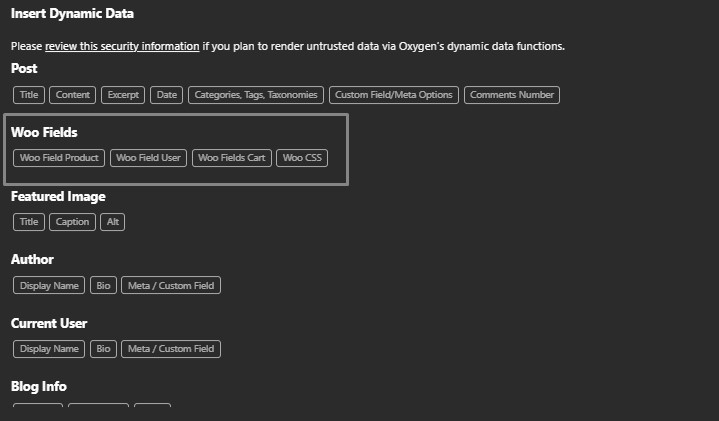
Let me introduce my new and improved Woo Fields snippet. You can now call them directly from the dynamic fields in Oxygen. Use them as dynamic fields or for conditional logic. It offers a wide range of fields to call from the product, user, or cart—and much more coming soon!
Updates
January 1, 2025
-New: A quick field search was added to speed up workflow.
-Fix: Resolved the issue where the precio_original field was sent when the product had no defined price.
-New: A quick field search was added to speed up workflow.
-Fix: Resolved the issue where the precio_original field was sent when the product had no defined price.
December 24, 2024
-Fields are now also displayed in images to extract image values
-Fields are now also displayed in images to extract image values
List Fields
Fields User Current
User Order Count (user_order_find):
Extracts the total number of orders placed by the current logged-in user or returns '0' if no user is logged in.
User Email (user_email):
Extracts the email address of the current logged-in user or returns 'No user logged in' if no user is authenticated.
User Billing Address (user_address_billing):
Extracts the full billing address of the current logged-in user, including name, address lines, city, state, postcode, country, phone, and email. Returns 'No user logged in' if no user is authenticated.
User Order Count (user_order_find):
Extracts the total number of orders placed by the current logged-in user or returns '0' if no user is logged in.
User Email (user_email):
Extracts the email address of the current logged-in user or returns 'No user logged in' if no user is authenticated.
User Billing Address (user_address_billing):
Extracts the full billing address of the current logged-in user, including name, address lines, city, state, postcode, country, phone, and email. Returns 'No user logged in' if no user is authenticated.
Fields Cart
Cart Product IDs (cart_product_ids):
Extracts all unique product IDs from the cart, including variations, or returns 'none' if the cart is empty or WooCommerce is not active.
Cart Total Items (cart_total_items):
Extracts the total number of items (quantity) in the cart or returns '0' if the cart is empty.
Cart Total Unformatted (cart_total_unformatted):
Extracts the total price of all items in the cart as a raw float value or returns '0' if the cart is empty.
Cart Total Before Shipping (cart_total_before_shipping):
Extracts and formats the subtotal price of all items in the cart before shipping costs are applied. Returns '0.00' with the currency symbol if the cart is empty.
Cart Shipping Cost (cart_price_shipping):
Extracts and formats the total shipping cost for the cart. Returns '0.00' with the currency symbol if no shipping is applied or the cart is empty.
Cart Total Price (cart_total_price):
Extracts and formats the total price of all items in the cart, including taxes and shipping costs, or returns '0.00' with the currency symbol if the cart is empty.
Cart Product IDs (cart_product_ids):
Extracts all unique product IDs from the cart, including variations, or returns 'none' if the cart is empty or WooCommerce is not active.
Cart Total Items (cart_total_items):
Extracts the total number of items (quantity) in the cart or returns '0' if the cart is empty.
Cart Total Unformatted (cart_total_unformatted):
Extracts the total price of all items in the cart as a raw float value or returns '0' if the cart is empty.
Cart Total Before Shipping (cart_total_before_shipping):
Extracts and formats the subtotal price of all items in the cart before shipping costs are applied. Returns '0.00' with the currency symbol if the cart is empty.
Cart Shipping Cost (cart_price_shipping):
Extracts and formats the total shipping cost for the cart. Returns '0.00' with the currency symbol if no shipping is applied or the cart is empty.
Cart Total Price (cart_total_price):
Extracts and formats the total price of all items in the cart, including taxes and shipping costs, or returns '0.00' with the currency symbol if the cart is empty.
Fields Product Current
Product ID (id):
Extracts the unique identifier for the product.
Product Type (type):
Extracts the type of product (e.g., simple, variable).
Product Name (name):
Extracts the name of the product.
Product Slug (slug):
Extracts the slug for the product, used in URLs.
Creation Date (date_created):
Formats and extracts the product's creation date.
Modification Date (date_modified):
Formats and extracts the product's last modification date.
Product Status (status):
Extracts the product's current status (e.g., published, draft).
Featured Product (featured):
Checks if the product is marked as featured and returns 'yes' or 'no'.
Catalog Visibility (catalog_visibility):
Extracts the product's visibility setting in the catalog.
Description (description):
Extracts the full description of the product.
Short Description (short_description):
Extracts the short description of the product.
SKU (sku):
Extracts the SKU (stock keeping unit) of the product.
Menu Order (menu_order):
Extracts the menu order value for the product.
Virtual Product (virtual):
Checks if the product is virtual and returns 'yes' or 'no'.
Original Price (price_original):
Formats and extracts the original price range for variable products or the formatted price for single products without WooCommerce classes.
Price (price):
Formats and extracts the current price, including tax based on WooCommerce settings.
Regular Price (regular_price):
Formats and extracts the regular price of the product.
Sale Price (sale_price):
Formats and extracts the sale price of the product.
Tax Suffix (tax_suffix):
Extracts the tax suffix displayed for the price, if configured.
Tax Included (tax_included):
Checks if tax is included in the product price and returns 'yes' or 'no'.
Price Including Tax (price_tax_included):
Formats and extracts the product price including tax.
Price Excluding Tax (price_tax_excluding):
Formats and extracts the product price excluding tax.
Variable Price Check (find_variable_price):
Checks if the product has variable pricing and returns 'yes' or 'no'.
On Sale (is_on_sale):
Checks if the product is currently on sale and returns 'yes' or 'no'.
Sale Start Date (date_on_sale_from):
Extracts and formats the start date of a sale.
Sale Expiration Date (date_on_sale_to):
Extracts and formats the expiration date of a sale.
Sale Expiration Year (date_on_sale_to_year):
Extracts the year from the expiration date of a sale, considering variations.
Sale Expiration Month (date_on_sale_to_month):
Extracts the month from the expiration date of a sale, considering variations.
Sale Expiration Day (date_on_sale_to_day):
Extracts the day from the expiration date of a sale, considering variations.
Discount Percentage (discount_percentage):
Calculates the discount percentage applied to the product.
Discount Amount (discount_amount):
Calculates the monetary discount amount applied to the product.
Total Sales (total_sales):
Extracts the total number of sales for the product.
Tax Status (tax_status):
Extracts the tax status of the product (e.g., taxable, none).
Tax Class (tax_class):
Extracts the tax class assigned to the product.
Stock Management (manage_stock):
Indicates whether the product has stock management enabled and returns 'yes' or 'no'.
Stock Quantity (stock_quantity):
Extracts the available stock quantity for the product.
Stock Status (stock_status):
Extracts the stock status of the product (e.g., in stock, out of stock).
Backorders (backorders):
Extracts the backorder status of the product or returns 'none' if not applicable.
Sold Individually (sold_individually):
Indicates if the product is sold individually and returns 'yes' or 'no'.
Purchase Note (purchase_note):
Extracts the purchase note associated with the product.
Shipping Class ID (shipping_class_id):
Extracts the shipping class ID assigned to the product.
Product Weight (weight):
Extracts the weight of the product along with the unit of measurement.
Product Length (length):
Extracts the length of the product along with the unit of measurement.
Product Width (width):
Extracts the width of the product along with the unit of measurement.
Product Height (height):
Extracts the height of the product along with the unit of measurement.
Product Dimensions (dimensions):
Extracts the overall dimensions (length, width, height) of the product.
Upsell Product IDs (upsell_ids):
Extracts the IDs of upsell products associated with the product or returns 'none' if there are no upsell products.
Cross-Sell Product IDs (cross_sell_ids):
Extracts the IDs of cross-sell products associated with the product or returns 'none' if there are no cross-sell products.
Parent Product ID (parent_id):
Extracts the ID of the parent product for a variation.
Child Product IDs (children):
Extracts the IDs of child products or variations or returns 'none' if there are no child products.
Child Attribute Names (children_names):
Extracts the names of attributes for the child products or variations or returns 'none' if no attributes exist.
Product Attributes (attributes):
Extracts the names of attributes associated with the product.
Default Product Attributes (default_attributes):
Extracts the default attribute values for the product or returns 'none' if not set.
Specific Attribute Value (attribute):
Extracts a specific attribute value of the product using its identifier or returns 'none' if the attribute is not found.
Category IDs (category_ids):
Extracts the category IDs associated with the product.
Tag IDs (tag_ids):
Extracts the tag IDs associated with the product.
Product Downloads (downloads):
Extracts the downloadable files associated with the product in JSON format or returns 'none' if no downloads are available.
Download Expiry (download_expiry):
Extracts the download expiry limit for the product or returns 'none' if no expiry is set.
Downloadable Product (downloadable):
Checks if the product is downloadable and returns 'yes' or 'no'.
Download Limit (download_limit):
Extracts the maximum number of downloads allowed for the product or returns 'unlimited'.
Main Image ID (image_id):
Extracts the ID of the main product image or uses a placeholder ID if none exists.
Main Product Image HTML (image):
Extracts the HTML for the main product image.
Gallery Image IDs (gallery_image_ids):
Extracts the IDs of the images in the product's gallery or returns 'none' if no gallery exists.
First Gallery Image ID (gallery_first_image_id):
Extracts the ID of the first image in the product's gallery or returns 'none' if no images exist.
Reviews Allowed (reviews_allowed):
Checks if reviews are enabled for the product and returns 'yes' or 'no'.
Product Has Ratings (has_ratings):
Checks if the product has any ratings and returns 'yes' or 'no'.
1-Star Ratings Count (rating_counts_1):
Extracts the count of reviews with a 1-star rating or returns '0' if none exist.
2-Star Ratings Count (rating_counts_2):
Extracts the count of reviews with a 2-star rating or returns '0' if none exist.
3-Star Ratings Count (rating_counts_3):
Extracts the count of reviews with a 3-star rating or returns '0' if none exist.
4-Star Ratings Count (rating_counts_4):
Extracts the count of reviews with a 4-star rating or returns '0' if none exist.
5-Star Ratings Count (rating_counts_5):
Extracts the count of reviews with a 5-star rating or returns '0' if none exist.
Average Rating (average_rating):
Extracts the average rating of the product, formatted to one decimal place.
1-Star Ratings Percentage (rating_percentage_1):
Calculates the percentage of 1-star ratings out of the total reviews or returns '0%' if no reviews exist.
2-Star Ratings Percentage (rating_percentage_2):
Calculates the percentage of 2-star ratings out of the total reviews or returns '0%' if no reviews exist.
3-Star Ratings Percentage (rating_percentage_3):
Calculates the percentage of 3-star ratings out of the total reviews or returns '0%' if no reviews exist.
4-Star Ratings Percentage (rating_percentage_4):
Calculates the percentage of 4-star ratings out of the total reviews or returns '0%' if no reviews exist.
5-Star Ratings Percentage (rating_percentage_5):
Calculates the percentage of 5-star ratings out of the total reviews or returns '0%' if no reviews exist.
Review Count (review_count):
Extracts the total number of reviews for the product or returns '0' if none exist.
Product in Cart Check (find_cart):
Checks if the product is present in the cart and returns 'yes' or 'no'.
Cart Product Image ID (cart_product_image_id):
Extracts the ID of the product's main image in the cart or uses a placeholder ID if none exists.
Cart Selected Attributes (cart_selected_attribute):
Extracts the selected attributes of a variable product in the cart or returns 'none' if no attributes are selected.
Cart Product Price (cart_product_price):
Extracts the price of a product in the cart, formatted with tax inclusion/exclusion settings.
Cart Quantity (cart_quantity):
Extracts the quantity of the product in the cart or returns '0' if the product is not in the cart.
Cart Product Title (cart_product_title):
Extracts the title of the product or its parent if it is a variation.
Cart Link (cart_link):
Generates a custom add-to-cart link for the product.
Cart Item Key (cart_item_key):
Extracts the cart item key for the product in the cart or returns 'none' if not found.
Remove Cart URL (remove_cart_url):
Generates the URL to remove the product from the cart or returns 'none' if not applicable.
Product ID (id):
Extracts the unique identifier for the product.
Product Type (type):
Extracts the type of product (e.g., simple, variable).
Product Name (name):
Extracts the name of the product.
Product Slug (slug):
Extracts the slug for the product, used in URLs.
Creation Date (date_created):
Formats and extracts the product's creation date.
Modification Date (date_modified):
Formats and extracts the product's last modification date.
Product Status (status):
Extracts the product's current status (e.g., published, draft).
Featured Product (featured):
Checks if the product is marked as featured and returns 'yes' or 'no'.
Catalog Visibility (catalog_visibility):
Extracts the product's visibility setting in the catalog.
Description (description):
Extracts the full description of the product.
Short Description (short_description):
Extracts the short description of the product.
SKU (sku):
Extracts the SKU (stock keeping unit) of the product.
Menu Order (menu_order):
Extracts the menu order value for the product.
Virtual Product (virtual):
Checks if the product is virtual and returns 'yes' or 'no'.
Original Price (price_original):
Formats and extracts the original price range for variable products or the formatted price for single products without WooCommerce classes.
Price (price):
Formats and extracts the current price, including tax based on WooCommerce settings.
Regular Price (regular_price):
Formats and extracts the regular price of the product.
Sale Price (sale_price):
Formats and extracts the sale price of the product.
Tax Suffix (tax_suffix):
Extracts the tax suffix displayed for the price, if configured.
Tax Included (tax_included):
Checks if tax is included in the product price and returns 'yes' or 'no'.
Price Including Tax (price_tax_included):
Formats and extracts the product price including tax.
Price Excluding Tax (price_tax_excluding):
Formats and extracts the product price excluding tax.
Variable Price Check (find_variable_price):
Checks if the product has variable pricing and returns 'yes' or 'no'.
On Sale (is_on_sale):
Checks if the product is currently on sale and returns 'yes' or 'no'.
Sale Start Date (date_on_sale_from):
Extracts and formats the start date of a sale.
Sale Expiration Date (date_on_sale_to):
Extracts and formats the expiration date of a sale.
Sale Expiration Year (date_on_sale_to_year):
Extracts the year from the expiration date of a sale, considering variations.
Sale Expiration Month (date_on_sale_to_month):
Extracts the month from the expiration date of a sale, considering variations.
Sale Expiration Day (date_on_sale_to_day):
Extracts the day from the expiration date of a sale, considering variations.
Discount Percentage (discount_percentage):
Calculates the discount percentage applied to the product.
Discount Amount (discount_amount):
Calculates the monetary discount amount applied to the product.
Total Sales (total_sales):
Extracts the total number of sales for the product.
Tax Status (tax_status):
Extracts the tax status of the product (e.g., taxable, none).
Tax Class (tax_class):
Extracts the tax class assigned to the product.
Stock Management (manage_stock):
Indicates whether the product has stock management enabled and returns 'yes' or 'no'.
Stock Quantity (stock_quantity):
Extracts the available stock quantity for the product.
Stock Status (stock_status):
Extracts the stock status of the product (e.g., in stock, out of stock).
Backorders (backorders):
Extracts the backorder status of the product or returns 'none' if not applicable.
Sold Individually (sold_individually):
Indicates if the product is sold individually and returns 'yes' or 'no'.
Purchase Note (purchase_note):
Extracts the purchase note associated with the product.
Shipping Class ID (shipping_class_id):
Extracts the shipping class ID assigned to the product.
Product Weight (weight):
Extracts the weight of the product along with the unit of measurement.
Product Length (length):
Extracts the length of the product along with the unit of measurement.
Product Width (width):
Extracts the width of the product along with the unit of measurement.
Product Height (height):
Extracts the height of the product along with the unit of measurement.
Product Dimensions (dimensions):
Extracts the overall dimensions (length, width, height) of the product.
Upsell Product IDs (upsell_ids):
Extracts the IDs of upsell products associated with the product or returns 'none' if there are no upsell products.
Cross-Sell Product IDs (cross_sell_ids):
Extracts the IDs of cross-sell products associated with the product or returns 'none' if there are no cross-sell products.
Parent Product ID (parent_id):
Extracts the ID of the parent product for a variation.
Child Product IDs (children):
Extracts the IDs of child products or variations or returns 'none' if there are no child products.
Child Attribute Names (children_names):
Extracts the names of attributes for the child products or variations or returns 'none' if no attributes exist.
Product Attributes (attributes):
Extracts the names of attributes associated with the product.
Default Product Attributes (default_attributes):
Extracts the default attribute values for the product or returns 'none' if not set.
Specific Attribute Value (attribute):
Extracts a specific attribute value of the product using its identifier or returns 'none' if the attribute is not found.
Category IDs (category_ids):
Extracts the category IDs associated with the product.
Tag IDs (tag_ids):
Extracts the tag IDs associated with the product.
Product Downloads (downloads):
Extracts the downloadable files associated with the product in JSON format or returns 'none' if no downloads are available.
Download Expiry (download_expiry):
Extracts the download expiry limit for the product or returns 'none' if no expiry is set.
Downloadable Product (downloadable):
Checks if the product is downloadable and returns 'yes' or 'no'.
Download Limit (download_limit):
Extracts the maximum number of downloads allowed for the product or returns 'unlimited'.
Main Image ID (image_id):
Extracts the ID of the main product image or uses a placeholder ID if none exists.
Main Product Image HTML (image):
Extracts the HTML for the main product image.
Gallery Image IDs (gallery_image_ids):
Extracts the IDs of the images in the product's gallery or returns 'none' if no gallery exists.
First Gallery Image ID (gallery_first_image_id):
Extracts the ID of the first image in the product's gallery or returns 'none' if no images exist.
Reviews Allowed (reviews_allowed):
Checks if reviews are enabled for the product and returns 'yes' or 'no'.
Product Has Ratings (has_ratings):
Checks if the product has any ratings and returns 'yes' or 'no'.
1-Star Ratings Count (rating_counts_1):
Extracts the count of reviews with a 1-star rating or returns '0' if none exist.
2-Star Ratings Count (rating_counts_2):
Extracts the count of reviews with a 2-star rating or returns '0' if none exist.
3-Star Ratings Count (rating_counts_3):
Extracts the count of reviews with a 3-star rating or returns '0' if none exist.
4-Star Ratings Count (rating_counts_4):
Extracts the count of reviews with a 4-star rating or returns '0' if none exist.
5-Star Ratings Count (rating_counts_5):
Extracts the count of reviews with a 5-star rating or returns '0' if none exist.
Average Rating (average_rating):
Extracts the average rating of the product, formatted to one decimal place.
1-Star Ratings Percentage (rating_percentage_1):
Calculates the percentage of 1-star ratings out of the total reviews or returns '0%' if no reviews exist.
2-Star Ratings Percentage (rating_percentage_2):
Calculates the percentage of 2-star ratings out of the total reviews or returns '0%' if no reviews exist.
3-Star Ratings Percentage (rating_percentage_3):
Calculates the percentage of 3-star ratings out of the total reviews or returns '0%' if no reviews exist.
4-Star Ratings Percentage (rating_percentage_4):
Calculates the percentage of 4-star ratings out of the total reviews or returns '0%' if no reviews exist.
5-Star Ratings Percentage (rating_percentage_5):
Calculates the percentage of 5-star ratings out of the total reviews or returns '0%' if no reviews exist.
Review Count (review_count):
Extracts the total number of reviews for the product or returns '0' if none exist.
Product in Cart Check (find_cart):
Checks if the product is present in the cart and returns 'yes' or 'no'.
Cart Product Image ID (cart_product_image_id):
Extracts the ID of the product's main image in the cart or uses a placeholder ID if none exists.
Cart Selected Attributes (cart_selected_attribute):
Extracts the selected attributes of a variable product in the cart or returns 'none' if no attributes are selected.
Cart Product Price (cart_product_price):
Extracts the price of a product in the cart, formatted with tax inclusion/exclusion settings.
Cart Quantity (cart_quantity):
Extracts the quantity of the product in the cart or returns '0' if the product is not in the cart.
Cart Product Title (cart_product_title):
Extracts the title of the product or its parent if it is a variation.
Cart Link (cart_link):
Generates a custom add-to-cart link for the product.
Cart Item Key (cart_item_key):
Extracts the cart item key for the product in the cart or returns 'none' if not found.
Remove Cart URL (remove_cart_url):
Generates the URL to remove the product from the cart or returns 'none' if not applicable.
EXAMPLE: